
Put ALL EC to work for you today!

Peppermint 9, released June 22, accomplishes something most other Linux distros don't: It melds the best components from other desktop environments and integrates them into a solid operating system.
Peppermint OS is a lightweight Ubuntu-based distribution featuring a desktop environment mashup of Xfce and LXDE components. The latest release nearly completes a process begun several upgrades ago, using more Xfce elements and fewer LXDE components.Peppermint is a good alternative to the Linux Mint Xfce release with a sprinkling of Cinnamon to spice up the desktop a bit more. Peppermint also uses Ice -- a cloud and Web application management tool -- which makes the operating system refreshingly different.
A site-specific browser, or SSB, Ice lets users easily create a launcher that connects to a website with desired content or services. It enables Peppermint OS users to connect to cloud applications and Internet URLs by clicking on menu items Ice adds. It also makes it possible to run apps without constantly being tethered to the Internet.
Given its Debian and Ubuntu roots, Peppermint 9 does not offer a radical change for most users, with possible exceptions being those coming from Arch Linux, or Fedora-based or RPM-based distributions. Peppermint 9 is based on Ubuntu 18.04 Long Term Support and features only several small changes over 8, released a year ago.
Combine all of what Peppermint 9 offers, and you get a Linux distro that is familiar and comfortable to use, as well as one with a collection of tools and tweaks not duplicated elsewhere. The result is an almost hybrid distro with its own unique flavor.
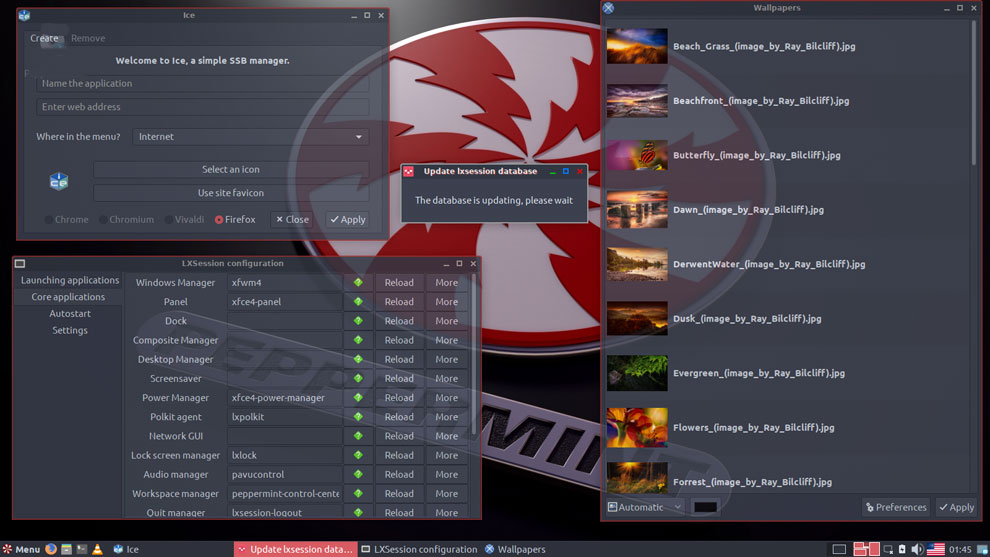
Peppermint OS comes with a collection of vibrant background images for the desktop and handy settings panel to configure the platform your way.
Cures Linux Lament
The availability of so many Linux desktop environments can be problematic. After reviewing old, new and renewed Linux distros every week, I often get frustrated when I find a unique and particularly interesting distro that stands apart from the many look-a-like options. I have a growing list of favorites and an equally growing collection of computers with multiple Linux OSes installed.Selecting a distro for regular use involves making a choice of which desktop features or user interface innovations justify not having other fanciful features the chosen distro left out. Peppermint 9 makes that choice easier, thanks to the Peppermint community's success in fusing bits and pieces of other distros into a well-oiled integrated platform.
icense to Chill
The Ice concept has been part of the Peppermint ecosystem from the distro's beginning in 2010. In fact, the developers consider it the distro's best feature.I am surprised that the Ice technology has not been integrated in other distros, but it is a distinguishing feature that makes the Peppermint OS more flavorful.
Ice allows Web content to function more like a standalone application window rather than a connected URL in a standard Web browser. This approach also offers the advantage of additional screen space. SSBs do not include all the functions and menus of a browser.
With the Ice app in Peppermint OS, it is easy to copy and paste a URL into Ice's location window along with other basic information. This one-time site setup creates a launcher icon on the desktop as well as a main menu entry.
Disappointing SSB Support
What is new in version 9 is a collection of Microsoft Office Online SSBs. These are links to the free Web app version of Office, which includes Excel, Word, OneNote and PowerPoint. The Internet section of the main menu also has SSB locations for connecting to Skype, the Peppermint User Guide Online and the Peppermint Forum.I was more enthused over using SSBs in earlier versions of Peppermint. That process is similar to configuring Android devices and Chromebooks to open a solitary Web browser window separate from other tabs in a running Web browser.
In essence, the Ice app is a glorified bookmark and menu entry-making tool. It has the appearance of being a standalone app, but it actually is an isolated Web browser window -- the default browser is Firefox. You can specify other installed browsers to open an isolated window instead.
I was disappointed with the lack of more pre-installed Ice launchers in the current release. Creating launchers is simple enough, but without a prepared list of sample locations, I suspect that typical users will not bother creating their own.
Look and Feel
If you are familiar with either the Linux Mint Cinnamon or Xfce editions, you already have a feel for the Peppermint UI. At first blush, they all pretty much have the same appearance and configuration flexibility. As you use Peppermint, however, the subtle tweaks will become noticeable. You will experience the blended desktop elements.The toolbar sits across the bottom of the screen and closely resembles the Cinnamon real estate. It is preconfigured with a workspace switcher applet set with two virtual desktops.
Right-click on the applet and select "Workspaces" to add or remove virtual workspaces. Right-click on the bottom bar itself to open a settings panel to adjust the bar and add more applets.
No comments